Quick Setup
Heart Rate & HRV
Why is my heart rate not showing during a session?
Heart rate requires explicit permission. On your iPhone, go to:
Health → your profile photo → Apps → iKima → turn on Heart Rate
Also make sure you are wearing Apple Watch snugly on your wrist — the optical sensor needs good skin contact.
No Apple Watch? Live heart rate during a session needs an Apple Watch. On iPhone alone, use the optional 20-second camera reading before and after a session instead — see How does the camera reading work?
The heart rate in Session Insight is different from what I see on the home screen — which is correct?
Both are correct, but from different moments:
- Home screen shows the current live reading (updated every few seconds)
- Session Insight shows a snapshot taken at the start and end of your session
If you check the home screen some time after your session ends, the numbers will naturally differ. This is expected.
What is HRV and how is it calculated?
HRV (Heart Rate Variability) measures the variation in time between heartbeats. A higher SDNN value generally indicates a more relaxed, resilient nervous system.
iKima reads the most recent SDNN sample from the past 7 days in Apple Health. Apple Watch measures HRV automatically during sleep or rest — it is not calculated in real time during a session.
My HRV seems very low — is that normal?
HRV varies enormously between individuals (15–100+ ms is a normal range). It is also affected by age, sleep quality, stress, hydration, and recent exercise.
What matters most is your personal trend over time, not comparison with others. Consistent breathing practice has been shown to improve HRV over weeks.
How does the iPhone camera reading work? Is it accurate?
Rest a fingertip over the rear camera and flash for 20 seconds. The flash lights up your fingertip and the camera watches the tiny colour changes as blood pulses through — the same idea as a smartwatch sensor, using your phone instead.
It is an estimate for self-observation, not a medical measurement. Keep still, cover the lens fully, and retry if the signal is weak — you can also skip it; your breathing session is never blocked or lost.
Camera frames are processed live on your phone and are never saved or uploaded. iKima labels each reading by source (camera or Watch) and only compares readings from the same session.
Sessions & Breathing
The session ended before I finished — what happened?
iKima runs the exact number of cycles you selected. When all cycles complete, the session ends naturally and moves to the mood check-in screen.
If the session ended unexpectedly, make sure the app was not force-quit (on iPhone or on Watch). If the issue persists, please contact us.
Can I change the speed of the breathing pattern?
Yes. On the pattern selection screen, tap the pace selector before starting. Options are Slow, Standard, and Fast — each adjusts the duration of each breath phase.
On Apple Watch, will the session continue if the screen turns off?
Yes. iKima uses an Extended Runtime Session to keep the haptic timer running even when the screen is off. You will still feel the tap guidance on your wrist.
My session data is not showing in the Statistics tab.
Sessions are saved on the device you practised on. Watch sessions sync to your iPhone automatically — if statistics look incomplete, open the iPhone app to trigger a sync. Data may take a few seconds to appear after a session ends.
App & Account
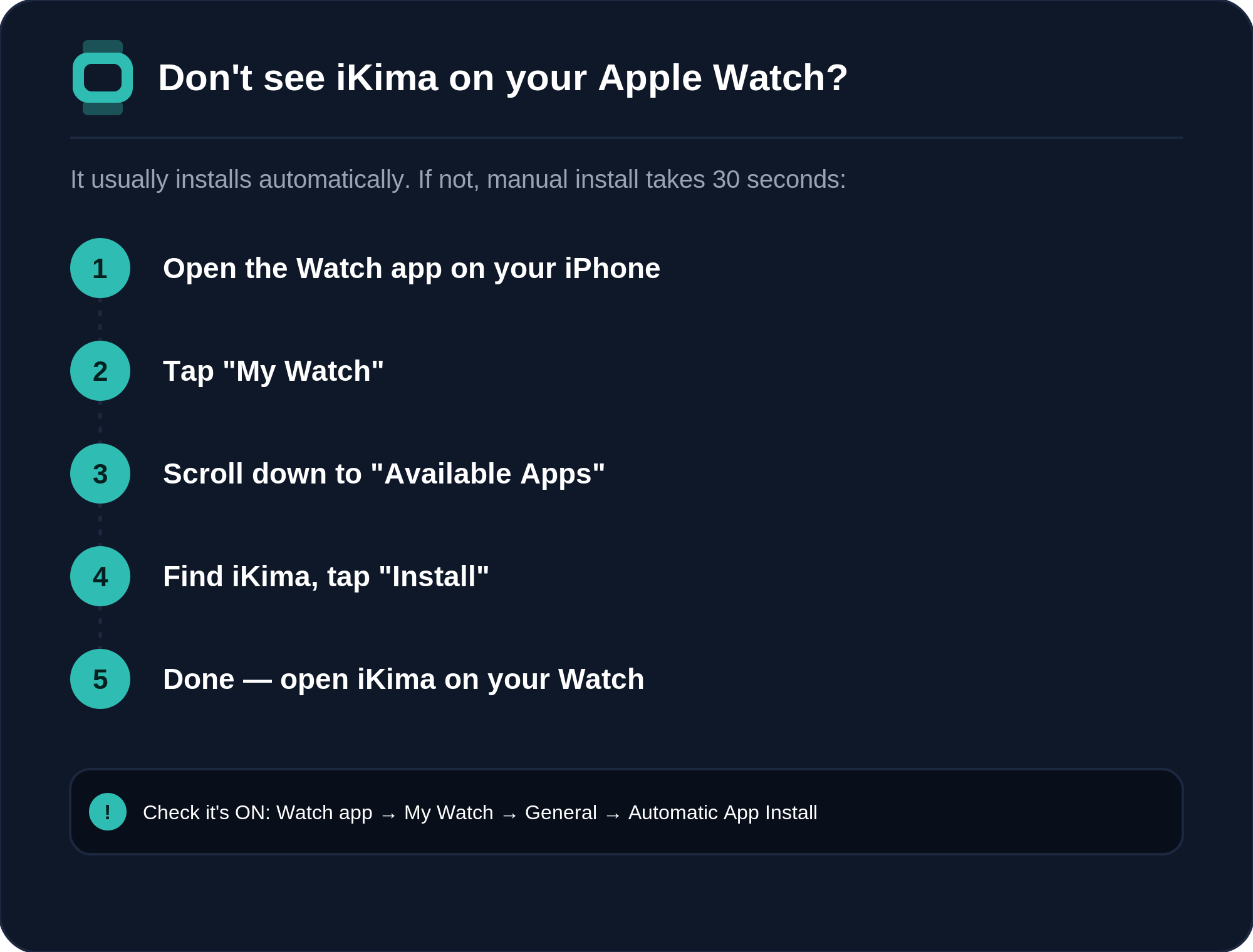
Don't see iKima on your Apple Watch?
In most cases, installing iKima on your iPhone automatically installs the Apple Watch app within a few minutes — no action needed. If it still doesn't appear (common after deleting and reinstalling the app), install it manually:
Do I need an account to use iKima?
No account is required. iKima's core breathing sessions work entirely on-device with no login and no cloud sync. Optional Premium features (full HR trends and insights) are available as an in-app subscription — the account-free, on-device design applies regardless of whether you subscribe.
Does iKima store my health data in the cloud?
No. Heart rate and HRV values never leave your device, and all health-related computation happens on-device.
If you choose to share usage analytics, iKima sends non-biometric usage events to Mixpanel using a random Support ID. These events never include heart rate, HRV, camera frames or raw signals. You can turn sharing off at any time in Settings → Your Data.
How do I delete my data?
To delete all iKima data stored on your iPhone, open the iPhone app → Settings → Your Data → Delete All Data. This permanently removes your practice history, settings and reminders from that iPhone, and resets your Support ID.
Apple Health data is managed separately in the Health app. iKima only reads Health data and never writes to Apple Health. The iKima Apple Watch app keeps its own data; to remove it, remove iKima from your Apple Watch.
To request deletion of analytics already sent to Mixpanel, email ikima@sentiralabs.app with the subject “Analytics Deletion” and your Support ID. If you requested a free offer code on our website, email us to have that email address removed.
Can I use iKima without an Apple Watch?
Yes. Every breathing technique, haptic guidance, Your Insights and your Relaxation Trend work on iPhone alone. The camera reading replaces the Apple Watch heart-rate sensor for before/after comparisons.
What an Apple Watch adds: live heart rate during a session, and HRV (SDNN) from Apple Health.
What's free, and what does Premium add?
Free, forever: Belly Breathing with haptic guidance, the camera reading, session history and mood check-ins — on iPhone and Apple Watch.
Premium adds four more techniques, Your Insights, your Relaxation Trend and personalised suggestions, on both devices. It's an auto-renewing subscription managed by Apple — cancel any time in Settings → Apple ID → Subscriptions.
I have an offer code — how do I redeem it?
If you received a redeem link, just tap it — the App Store opens, installs iKima if needed, and turns on Premium.
If you only have the code: open the App Store app → tap your profile (top right) → Redeem Gift Card or Code → Enter Code Manually → paste the code. Each code works once, and your Apple ID region must match the code's region.
Which devices are supported?
An iPhone running iOS 17 or later is all you need. The camera reading uses the rear camera and flash.
Apple Watch is optional: watchOS 10 or later (Series 4 and newer). All supported models have the optical heart sensor used for live heart rate.